
Download Organize Status Bar – Firefox status bar manager, free, secure, customizable
Overview
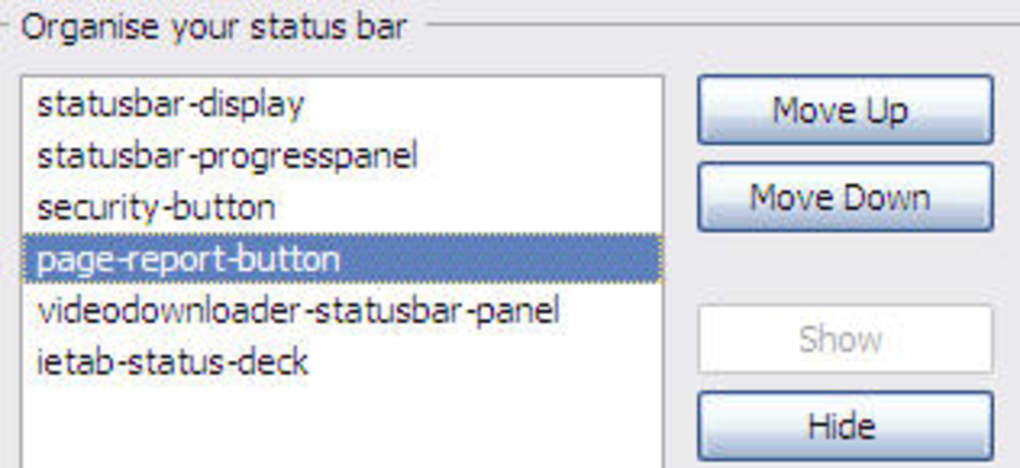
Organize Status Bar (OSB) is a lightweight Firefox extension designed to give you total control over the clutter that can accumulate in the browser’s status bar. If you’ve ever found yourself squinting at a jumble of icons, progress indicators, and security symbols while trying to focus on a web page, OSB offers a clean, intuitive way to rearrange, hide, or reveal each element. The extension works by adding a simple configuration window that lists every status‑bar item – from the page‑loading progress bar to third‑party extension icons – and lets you move them up or down with a pair of arrow buttons.
You can also toggle visibility, allowing you to keep only the information you truly need. Although the status bar is optional in newer Firefox versions, many power users still rely on it for quick feedback about page load speed, connection security, or active extensions. OSB respects that workflow and enhances it without sacrificing performance.
Installation requires a one‑time browser restart, after which the tool becomes part of your Add‑ons manager. From there you can launch the organizer at any time via Tools → Add‑ons → Extensions → Organize Status Bar. Whether you’re a developer juggling multiple debugging extensions, a privacy‑conscious surfer who wants to hide security icons, or simply someone who appreciates a tidy interface, OSB delivers a free, secure solution that restores order to your Firefox status bar.
Key Features
- Drag‑and‑drop reordering: Move any status‑bar item up or down with intuitive arrow controls.
- Visibility toggles: Hide icons, text, or the progress bar with a single click, reducing visual noise.
- Full‑item list: The organizer displays every element, including built‑in Firefox symbols and third‑party extension icons.
- One‑click restore: Reset to the default layout instantly if you ever want to revert changes.
- Lightweight footprint: OSB adds less than 50 KB to your browser profile, ensuring no noticeable slowdown.
- Secure updates: Receives signed updates via Mozilla’s Add‑ons portal, guaranteeing authenticity.
- Multi‑language support: Interface translated into several languages, making it accessible to a global audience.
- Compatibility with Firefox Quantum: Works seamlessly with the latest Firefox releases, including ESR and developer builds.
Beyond these core capabilities, OSB integrates neatly into Firefox’s existing add‑on management UI, so you never have to leave the browser to adjust your status bar. The extension also respects user privacy – it does not collect telemetry or send data to external servers. Because OSB is an open‑source project hosted on GitHub, you can audit the code yourself or contribute improvements. The combination of a minimalistic design, robust feature set, and transparent development model makes Organize Status Bar a standout tool for anyone looking to declutter their browsing experience without compromising on functionality.
Installation, Usage & Compatibility
Getting started with Organize Status Bar is straightforward. First, visit the official Mozilla Add‑ons page and click the Add to Firefox button. After the download completes, Firefox will prompt you to confirm the installation; accept the permissions, and then restart the browser as instructed. The restart is required because OSB modifies the status‑bar UI at launch time.
Once Firefox is back up, open the organizer by navigating to Tools → Add‑ons → Extensions → Organize Status Bar and clicking the Preferences button. A dedicated window appears, listing every status‑bar item in a vertical column. Use the up and down arrows on the right side of each row to reposition items. To hide an element, simply uncheck the box next to its name; the icon or text disappears from the status bar immediately. If you later decide you need the item back, re‑check the box and it will reappear in its original location.
Compatibility: OSB is built for the desktop version of Firefox on Windows, macOS, and Linux. It leverages standard WebExtension APIs, ensuring it works across all platforms that support Firefox 78+ (including the Extended Support Release). The extension does not run on mobile Firefox (Android or iOS) because those builds lack a traditional status bar, but the codebase is open for future adaptation if Mozilla ever re‑introduces that UI element.
For power users, OSB offers a few hidden shortcuts. Holding Shift while clicking an arrow moves the selected item by two positions instead of one, speeding up large rearrangements. You can also export your current layout as a JSON file via the Export button, allowing you to share a custom configuration with teammates or restore it after a fresh Firefox install.
Overall, the installation process takes less than a minute, and the usage interface is deliberately simple to keep the learning curve shallow. Because OSB does not require any additional runtime components or external libraries, it remains secure and stable even after multiple Firefox updates.
Pros, Cons & Frequently Asked Questions
Pros
- Free and open‑source, with no hidden fees or ads.
- Lightweight and fast; negligible impact on browser performance.
- Intuitive UI that integrates with Firefox’s native add‑on manager.
- Full control over every status‑bar element, including third‑party icons.
- Secure updates signed by Mozilla, ensuring authenticity.
- Export/Import feature for easy backup and sharing of custom layouts.
Cons
- Requires a browser restart after initial installation.
- Only works on desktop Firefox; no mobile support.
- Limited to status‑bar customization; does not affect other UI areas.
- Some users may find the status bar itself unnecessary, making OSB redundant.
FAQ
Do I need to be a Firefox power user to benefit from Organize Status Bar?
No. While developers and users with many extensions gain the most, anyone who feels the status bar is cluttered can use OSB to streamline the view.
Will OSB collect any personal data or send telemetry?
No. The extension is open source and does not contain any analytics or data‑sending code. All configuration is stored locally.
Can I hide the entire status bar if I don’t need it?
Yes. OSB includes a master toggle that hides all status‑bar items at once, effectively removing the bar from view without disabling the underlying functionality.
Is the extension compatible with Firefox ESR 102?
Absolutely. OSB supports all Firefox releases from version 78 onward, including the Extended Support Release line.
How do I revert to the default status‑bar layout?
Press the Reset to Default button in the organizer window. This instantly restores the original ordering and visibility settings.
Conclusion & Call to Action
Organize Status Bar delivers exactly what its name promises: a fast, free, and secure way to tidy up the Firefox status bar. By giving you granular control over each icon, text element, and progress indicator, OSB turns a potentially chaotic UI into a streamlined, information‑rich strip that works for you—not against you. The installation is painless, the user interface is intuitive, and the performance impact is negligible. Even if you only have a handful of extensions, the ability to hide the progress bar or security symbols can reduce visual distraction and make your workflow smoother.
Because the extension is open source and receives signed updates through Mozilla’s official channel, you can trust that it remains safe and up‑to‑date. Whether you’re a developer juggling debugging tools, a privacy‑focused user who wants to conceal security badges, or simply someone who enjoys a clean desktop, Organize Status Bar is worth a try. Download it today, customize your status bar in seconds, and experience a tidier, more efficient Firefox browsing session.
Ready to declutter? Click the Download Organize Status Bar button now and enjoy a cleaner Firefox experience.







